Understanding the BiDi Algorithm: How Computers Render RTL Text
What is the BiDi algorithm and how does it work?
When we write Arabic text that contains English words or numbers, things can sometimes show up in a weird order. It’s not that the computer “understands Arabic” or “understands English” the way we do — it’s actually dealing with bytes first, then encodings like Unicode and UTF-8, and finally a rendering algorithm called BiDi.
In this post we’ll walk through the whole journey: how characters get stored in memory, how each character or symbol gets its own unique number, and then how the system decides the display order when Arabic and English end up on the same line.
1. How does text get stored inside a computer?
Computers don’t understand letters or images the way we see them. At the end of the day, it’s all just zeros and ones: 0 and 1. The smallest unit here is a bit, and a byte is made up of 8 bits.
So text inside a computer isn’t stored as “letters” — it’s stored as a sequence of bytes.
2. Where it all started: ASCII
Back in the 1960s, ASCII came along and assigned a number to every English letter and common symbol. For example:
- The letter
Ais65 - The letter
ais97
It worked fine for English, but it was way too limited — it only covered a small set of characters and symbols, so it had nothing for languages like Arabic, Chinese, or Japanese.
3. The bigger solution: Unicode
Unicode was created to fix exactly that. The idea is simple: give every character in every language a unique number called a Code Point.
Some examples:
- The letter
أisU+0623 - The letter
بisU+0628 - The emoji
😊isU+1F60A
But Unicode alone doesn’t answer the question: how do we actually store these numbers in a file or in memory? That’s where UTF-8 comes in.
4. How does UTF-8 work?
UTF-8 is the most widely used text encoding system in the world today. Its job is to convert Unicode code points into actual bytes that can be stored and transmitted.
What makes UTF-8 great is that it’s flexible:
- 1 byte: for most basic ASCII/English characters
- 2 bytes: for many characters like basic Arabic letters
- 3 or 4 bytes: for more complex characters like certain symbols and emojis
This is what makes it practical — English text stays compact, while it can still represent most of the world’s languages.
Let’s take an example. Say we want to store the text A س b in a computer. The simplified representation might look something like this:
| 01000001 | 00100000 | 11011000 10110011 | 00100000 | 01100010 |
|---|---|---|---|---|
| A | space | س | space | b |
Notice how the Arabic character needs more than one byte, unlike basic ASCII/English characters.
Important note: The computer doesn’t store any information saying “this chunk should be read right-to-left.” It just stores bytes. The display direction on screen gets handled later — and that’s exactly where the BiDi algorithm becomes important.
5. Why do we need the BiDi algorithm?
If a sentence is entirely in Arabic, there usually isn’t a visible problem. Same goes for entirely English text. The challenge shows up when you mix directions on the same line, like:
مرحبا hello 42Knowing the characters isn’t enough here — we need rules that decide how these characters are displayed on screen in the right order. That’s the job of the BiDi algorithm, short for Bidirectional Algorithm.
6. How does BiDi determine paragraph direction?
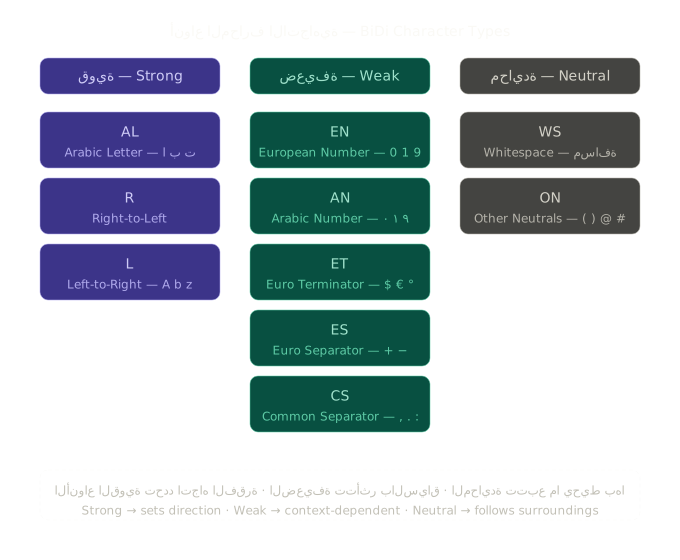
Unicode assigns every character a directional property called a Bidi Character Type. Some characters are:
- R or AL: characters displayed right-to-left
- L: characters displayed left-to-right
- EN: European numbers
- WS: Whitespace
The algorithm then looks for the first strong character outside any Isolates to determine the base paragraph direction (P1, P2, P3). If the first strong character is Arabic, the base direction becomes RTL.

R => Arabic L => Latin EN => European number WS => Whitespace
7. Embedding Levels
Once the paragraph direction is set, the algorithm assigns each segment an embedding level. The core idea is:
- Even levels mean left-to-right display
- Odd levels mean right-to-left display
A level doesn’t describe “what type of character this is” — it describes where the segment sits in the text structure and its display direction.

Levels in a nutshell:
- Even number = LTR
- Odd number = RTL
- Each time we enter a segment with a different direction, the level may go up
- The maximum level is 125
Example of a base LTR paragraph:
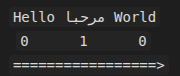
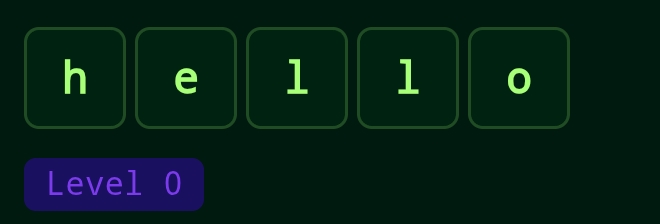
Here the English text starts at level 0, and when an Arabic segment appears inside it, the level may rise to 1.
And an example of a base RTL paragraph:
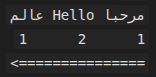
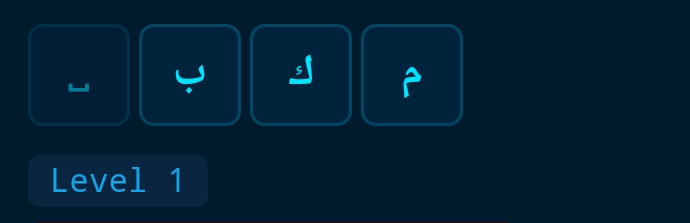
Here the Arabic text starts at level 1, and when an English segment appears inside it, the level may rise to 2.
8. What about spaces and punctuation?
Not every character has a clear direction. Spaces and some punctuation marks are considered neutral, and their direction gets resolved based on context.
If a space sits between two segments of the same type, it tends to take their direction. But if it’s between an Arabic segment and an English one, it may fall back to the base paragraph direction. This is why spaces sometimes end up in spots that look weird if you don’t know how BiDi works.
The two core rules here are N1 and N2: neutral characters may take on the direction of what surrounds them, or fall back to the paragraph direction if the context on either side differs.

9. What are Runs?
After computing the levels, the sentence gets split into groups of adjacent characters that share the same level. These groups are called Runs.
Let’s take this sentence as an example:
مرحبا hello بكمIt might get split into several consecutive Runs, some RTL and some LTR, based on the computed level for each part.
10. Reordering the Runs
Once the algorithm has computed the levels and identified the Runs, the last step is reordering for display.
The general rule goes like this:
- Start from the base paragraph level.
- Look at the segments by their levels.
- Even-level segments are displayed visually left-to-right.
- Odd-level segments are displayed visually right-to-left.
- When there’s nesting, processing starts from the highest levels down.
(Unicode UAX #9 — Reordering Resolved Levels)
A practical example
Say we have this text:
مرحبا hello بكمIf the base paragraph level is 1, a simplified breakdown might look like:
مرحبا→ level1→ RTLspace→ level1→ RTLhello→ level2→ LTRspace→ level1→ RTLبكم→ level1→ RTL
After applying the reordering rules, the text appears on screen like this:
مرحبا hello بكم
A few things to notice here:
- The English word didn’t get its internal characters reversed — it’s still LTR
- The Arabic segments were displayed within an RTL context
- The position of the spaces was affected by the level and surrounding context
Wrapping up
To really understand mixed Arabic-English text, it helps to think in three separate layers:
- Unicode: gives every character a unique number.
- UTF-8: defines how that number gets stored as bytes.
- BiDi: decides how those characters are actually displayed on screen when directions mix.
So the problem isn’t just about “storing Arabic” — it’s about the whole journey from numeric representation to correct visual rendering. Once you understand this pipeline, a lot of the weird behavior you’ve probably seen in mixed-direction text starts to make total sense.